This overview section summarizes assumptions and limitations of the following aspects of the model:
General Process
The following sections list Assembly processes, describe some important assumptions of the Assembly cost model, and discuss several ways in which Assembly processes differ from the processes in other process groups.
Supported Processes
Assembly process group routings support the following main processes:
-
Pick and Place: includes picking each subcomponent from a bin and loading into the assembly or fixture. It also includes clamping regions of contact between parts to prepare for subsequent welding operations if necessary.
-
Lock Bolt: uses a bolt-type fastener which is permanently installed and cannot be removed, providing a vibration resistant and maintenance free joint. You must manually assign the Lock Bolt operation (Lock Bolt Install) to one member of each pair of subcomponents to by joined in this fashion.
-
Threaded Insert: installs inserts into threaded holes in order to make screws and bolts more secure and resistant to vibrations and impacts. You must manually assign the Threaded Insert operation to one member of each pair of subcomponents to by joined with the help of such an insert. (You must separately assign a Screw Tighten operation from the Mechanical Assembly process.)
-
Rivet: either rivets all holes within a specified size range, or rivets a specified number of holes.
-
Mechanical Assembly: includes assembly operations that are assumed to be performed by hand on specified components. These operations include Nut Insert, Rivet, Press Fit, and Tab Bend, among others. You must manually assign an operation to each subcomponent that requires it. In a case where two subcomponents are held together with a fastener, a fastening operation only needs to be applied to one of the subcomponents.
-
Adhesive Bonding: uses a high-strength bond to join components that are made of various materials. You must manually include the Adhesive Bonding process in your routing; adhesive bonding is then assumed to be applied to all the regions of contact between the assembly's subcomponents).
-
Sealing: there are three sealing processes, which are used to prevent gas or moisture from getting between components:
-
Cap Sealing: applied around fasteners or rivets.
-
Fay Sealing: used to prevent galvanic (dissimilar metal) corrosion.
-
Fillet Sealing: applied to relatively long, thin regions.
-
-
Welding: there are nine welding processes:
Except for Ultrasonic Welding, each welding process has a single operation, which the cost model applies to each appropriate Weld GCD; see Welding Operation Feasibility for more information.
Welding (except for Ultrasonic Welding) is optionally preceded by the Weld Prep process (Bevel Cutting, Grinding, and/or Wire Brushing operations) and optionally followed by Weld Clean Up (Grinding operations). You must manually assign the appropriate prep and cleanup operations to the appropriate Weld GCDs.
Ultrasonic Welding is feasible only for assemblies whose primary process group is Assembly Plastic Molding Process Group. It has an operation that applies to Subcomponent GCDs whose Subcomponent Type is Assembled.
Optional secondary processes include Machining, Surface Treatment, Heat Treatment, and Packaging, if you have licensed these modules.
Assembly Cost Tables
The cost tables for assemblies include the following:
-
Assembly Details
-
Assembly Tracker
-
Cost Summary
See Assembly Views for more information. See also the Cost Tables chapter of the aPriori Professional User Guide.
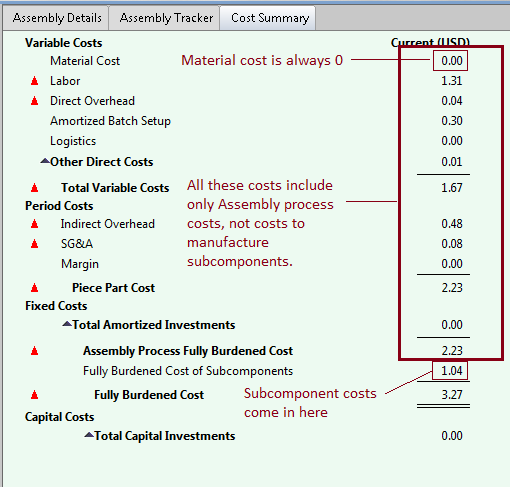
The Cost Summary table for assemblies has several notable features:
-
All costs listed at and above Assembly Process Fully Burdened Cost including only costs for assembly processes, and exclude costs for manufacturing the subcomponents.
-
Subcomponent process costs are listed at Fully Burdened Cost of Subcomponents.
-
Material Cost is always 0.
Labor Time and Cycle Time
The assembly cost model derives costs largely from data about standard times associated with basic assembly tasks (such as tightening a screw, or bending a tab). For each task, this is the time it takes one operator to perform that task. The model calculates labor time per part based on these values. In contrast to other process groups, which usually derive labor time from cycle time, Assembly processes sometimes derive cycle time from labor time.
Labor Time, Cycle Time, and Number of Operators
For processes from other groups, increasing the number of operators typically increases labor time and labor cost per part, and does not affect cycle time per part. For Assembly processes, in contrast, increasing the number of operators often decreases cycle time and does not affect labor time or labor cost. The Assembly cost model assumes the use of an assembly line that can be sped up or slowed down through the addition or removal of operators.
Cycle time is assumed to be inversely proportional to the number of operators for many operations, and labor time is assumed to be independent of the number of the number of operators. Exceptions include robotic processes and load/unload and clamping operations.
Overhead
As with other process groups, indirect overhead for Assembly processes depends on cycle time:
Indirect Overhead Cost per Part = Indirect Overhead Rate *
(Cycle Time + Amortized Batch Setup) / Final Yield
But unlike other process groups, direct overhead for Assembly processes is independent of cycle time:
Direct Overhead Cost per Part =
((Labor Cost * Overhead Multiplier) +
(Direct Overhead Rate * Labor Time)) / Final Yield
Cycle Time Overrides and Adjustments
Because cycle time does not affect direct overhead, and because cycle time is often derived from labor time (and not vice versa), cycle time sometimes affects costs only through its effect on indirect overhead. In those cases, overriding cycle time (or adjusting it with the cost model variable cycleTimeAdjustmentFactor) doesn’t affect labor time or labor cost. You should override or adjust cycle time in such cases only to affect indirect overhead, for example, to account for the cost of extra buffer space required by an unbalanced push assembly line.
Task Parallelism and Robotic Welding
For routings that include Robotic MIG Welding or Robotic TIG Welding, the cost model assumes that at least some of the Robotic Welding operators perform manual tack welding and pick and place tasks, in addition to tending to one or more robotic welding machines (one, by default). This can sometimes reduce costs compared to routings with Manual Welding, because the operator is assumed do tacking and pick and place on one piece during the time that the robot is welding another piece.
The number of operators for the Pick and Place process (specified by a PSO or machine property) indicates the total number of operators performing pick and place tasks, including the Robotic MIG Welding operators that perform pick and place tasks. By default, for routings with Robotic MIG Welding, the cost model assumes that there are no dedicated pick and place operators, and that all pick and place tasks are performed by one Robotic MIG Welding operator.
Part Geometry
Assemblies have some special types of GCDs:
-
Subcomponents (visible when you expand Subcomponents in the Geometric Cost Drivers pane): the current assembly is composed of parts and possibly other assemblies. Each such part or assembly corresponds to a subcomponent GCD. For more information see Working with assembly components in the User Guide chapter Using aPriori Desktop.
-
Welds (listed under Joining in the Geometric Cost Drivers pane): weld GCDs are either extracted from the CAD model or (for virtual welds) added manually with the Weld tool--see Assembly Welds for more information.
-
ContactRegions: A ContactRegion represents a single continuous area of contact between two parts (where each of the two parts is a non-assembly, that is, a leaf-level Subcomponent in the assembly Subcomponent tree). Each of the two parts bears the Lies On relation to the ContactRegion. If there is a Weld on the edge of a ContactRegion, the Weld bears the Lies On Relation to the ContactRegion (which helps the cost model estimate clamping requirements).
Under the Joining node in the Geometric Cost Drivers pane, ContactRegions are divided into Top Level ContactRegions and Lower Level ContactRegions. The Top Level ContactRegions are those that are in a Top Level ContactGroup (see below). The rest are Lower Level ContactRegions.
Certain operations, such as Adhesive Bonding and Fay Sealing, are performed on ContactRegion GCDs.
See Contact Regions and Contact Groups for more information.
-
ContactGroups: A ContactGroup represents all the regions of contact between a pair of siblings in the Subcomponent tree. The Top Level ContactGroups are those that represent the regions of contact between top-level Subcomponents. The rest are Lower Level ContactGroups.
The Clamping operation of the Pick and Place process is performed on ContactRegion GCDs, in order to model clamping in preparation for welding.
See Contact Regions and Contact Groups for more information.
Note that the Component GCD Component:1 represents the assembly as a whole.
Note also that the Assembly process group does not extract any other types of GCDs, such as holes or bends in Subcomponents, except where such features are expected to be created by post-assembly machining (see Assembly Machining).

Materials
The processes in this group do not use any material; material cost is always 0 for all processes. Welding wire is considered to be expendable tooling; see MIG Welding Expendable Tooling Calculation, TIG Welding Expendable Tooling Calculation, and Spot Welding Expendable Tooling Calculation.
Machines
Welding machines in starting point Digital Factories include the following:
-
Miller manual spot welders
-
PerformArc robotic spot welders
-
ESAB and Deltaweld manual MIG welders
-
Pro Robots and ICS Robotics robotic MIG welders
-
MINIARC and Maxstar manual TIG welders
-
Motoman robotic TIG welders
Each welding process also has a default, virtual machine. The following tables list various properties for MIG welding machines (other machine properties don’t vary from MIG welding machine to MIG welding machine):
Manual MIG Welding
|
Property |
Low End |
High End |
|---|---|---|
|
Wire Feed Rate (mm / sec) |
148.0 |
212.0 |
|
Wire Diameter (mm) |
0.89 |
1.32 |
|
Machine Length (mm) |
914.40 |
966.22 |
|
Machine Width (mm) |
457.20 |
661.42 |
|
Price (USD) |
3400.00 |
3715.00 |
|
Machine Direct Overhead Rate (USD / hr) |
1.07 |
1.09 |
|
Machine Indirect Overhead Rate (USD / hr) |
8.85 |
9.05 |
Robotic MIG Welding
|
Property |
Low End |
High End |
|---|---|---|
|
Wire Feed Rate (mm / sec) |
148.0 |
212.0 |
|
Wire Diameter (mm) |
0.89 |
1.60 |
|
Machine Length (mm) |
6096.00 |
6096.00 |
|
Machine Width (mm) |
3048.00 |
3048.00 |
|
Price (USD) |
100,000.00 |
100,000.00 |
|
Machine Direct Overhead Rate (USD / hr) |
8.95 |
8.95 |
|
Machine Indirect Overhead Rate (USD / hr) |
10.64 |
10.64 |
Manual TIG Welding
|
Property |
Low End |
High End |
|---|---|---|
|
Wire Feed Rate (mm / sec) |
267.0 |
267.0 |
|
Machine Length (mm) |
400.00 |
1111.00 |
|
Machine Width (mm) |
146.00 |
610.00 |
|
Price (USD) |
932.00 |
17,544.00 |
|
Machine Direct Overhead Rate (USD / hr) |
1.07 |
1.07 |
|
Machine Indirect Overhead Rate (USD / hr) |
12.09 |
12.09 |
Robotic TIG Welding
|
Property |
Low End |
High End |
|---|---|---|
|
Wire Feed Rate (mm / sec) |
267.0 |
267.0 |
|
Machine Length (mm) |
2868.00 |
6242.00 |
|
Machine Width (mm) |
2475.00 |
5615.00 |
|
Price (USD) |
65,000.00 |
150,000.00 |
|
Machine Direct Overhead Rate (USD / hr) |
6.48 |
6.48 |
|
Machine Indirect Overhead Rate (USD / hr) |
10.76 |
10.76 |
Manual Spot Welding
|
Property |
Low End |
High End |
|---|---|---|
|
Power (kW) |
10 |
34 |
|
Price (USD) |
605.00 |
5340.00 |
|
Length (mm) |
914.40 |
966.22 |
|
Machine Direct Overhead Rate (USD / hr) |
0.84 |
3.12 |
|
Machine Indirect Overhead Rate (USD / hr) |
8.95 |
8.99 |
|
|
|
|
Robotic Spot Welding
|
Property |
Low End |
High End |
|---|---|---|
|
Power (kW) |
10 |
10 |
|
Price (USD) |
100,000.00 |
100,000.00 |
|
Length (mm) |
6096.00 |
6096.00 |
|
Machine Direct Overhead Rate (USD / hr) |
8.95 |
8.95 |
|
Machine Indirect Overhead Rate (USD / hr) |
10.64 |
10.64 |
See Machine Selection for more information.
Tooling
The processes in this group do not use non-expendable tooling. Welding wire is considered to be expendable tooling; see MIG Welding Expendable Tooling Calculation, TIG Welding Expendable Tooling Calculation, and Spot Welding Expendable Tooling Calculation.